New Version 4.93.03

Information about latest Revision level of the software
and current Download Links.
Google Feedfetcher
Full Member
Full Member
Posts: 125
Joined: Tue Jan 06, 2026 4:56 pm

Re: New Version 4.93.03

Post by Google Feedfetcher »

OK designed my gear in GT
Bit special [ more later ] got more corrections than a Tippex factory.

Sent it to 3D printing as an STL

Now how do I get back to that gear to make more alterations for a second gear.

All I have is the STL screen, or DXF or Print.
If I select tools and circular gears I get to start off new again with M5 as default mod.

Only way i can get it to do it and loose e the gear thats now written in stone in the project screen is to exit the program and start again.

The more later bit
Sorting the design out for a job.

Oh how things have progressed. Did the design work and drawing yesterday.

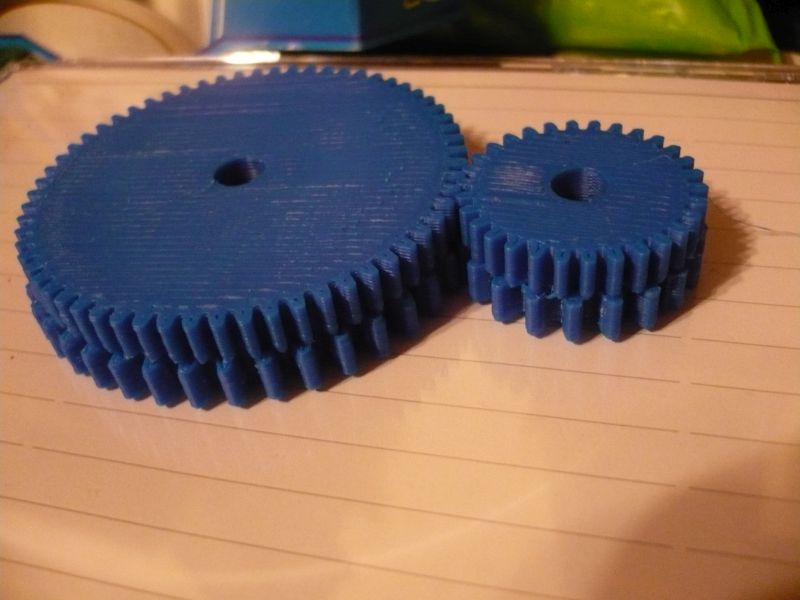
'Made' 4 gears today on the 3D printer to prove the concept on a simple jig. Two seperate gears and one double pinion made all in one.

The production gears will be separate gears pressed on a shaft but easier to print together.

OK doesn't look anything special but the ratio needed has to be accurate to 3 decimal places, no plus or minus.

100 year old gear book gave me the ratios
Image

Gearotic gave me the options using two different pitches. Now here is where it gets fancy. None of the 4 gears are standard, the two finer teeth ones are corrected so they fit fixed centres that are written in stone.

Of the two courser gears one is standard for the pitch, one is corrected but both have the pitch corrected to fit the same centres.

Anyone know where I can get a 44.53 DP gear cutter ? wink
ArtF
Global Moderator
Global Moderator
Posts: 4557
Joined: Sun Sep 05, 2010 5:14 pm
Contact:

Re: New Version 4.93.03

Post by ArtF »

John:

:-)

>>Only way i can get it to do it and loose e the gear thats now written in stone in the project screen is to exit the program and start again.

  You can press the "new project" icon ( top left of bar), OR select the gear by mouse on screen or project tree, and then press
delete on the properties tab. The first will get rid of all objects, the second just gets rid of one.

>>Now how do I get back to that gear to make more alteratio ns for a second gear.

  You use the Redesign button...( not yet implemented, should be out fairly soon though..)... :)

>>Anyone know where I can get a 44.53 DP gear cutter ?

I guess you could use the dxf of the involute profile to make a cutter
or we could start the discussion of how the heck I can do it for you from the dxf profile. GM's cutter maker didnt work
great , so I think we have to figure out the best GCode method of creating a cutter.. Ive made sure GT has the data
to create it, just a question now as to how best to do it..

(Gears look good though.. good 3d printer, eh?)

Art


Google Feedfetcher
Full Member
Full Member
Posts: 125
Joined: Tue Jan 06, 2026 4:56 pm

Re: New Version 4.93.03

Post by Google Feedfetcher »

Printer is fine but a lot of the parts I have made with the blue filament haven't come out as good as the white that came with the machine even though they are both genuine filament.

Overall very pleased with it.

Found something very useful. RS Components worldwide have released a cut down version of Spaceclaim that they call Designspark

Google it and download it, it's free, then you can go on their website and download loads of things for all sorts of manufacturers, load it into Designspark, save as STL and print it.

I did a small 10 pin plastic connector I had broken the other day, printed the new holder and swapped the pins over into the new one.

Connectors from RS were in quantities of 10 
ArtF
Global Moderator
Global Moderator
Posts: 4557
Joined: Sun Sep 05, 2010 5:14 pm
Contact:

Re: New Version 4.93.03

Post by ArtF »

Wow.. that IS a good way of making connectors and such isnt it.. Man..what a world we're entering..

Art
Post Reply